If you’ve ever looked at your monthly IT costs and thought “I’m not sure what we’re actually paying for,” you’re not alone. Most small business owners know technology costs money – they just aren’t sure how much is reasonable, what categories to plan for, or whether they’re over or under-investing. This guide breaks it all down so you can build a business IT budget that’s realistic, strategic, and built to scale.
Why Most Businesses Underestimate Their IT Costs
The most common mistake small businesses make is budgeting only for computers and internet. But technology touches nearly every part of your operation: your phones, your data, your security, your software, and the people or partners who keep it all running.
When businesses don’t plan proactively, they end up in a cycle of reactive spending – paying more to fix things after they break than it would have cost to maintain them in the first place. A well-structured IT budget is how you get ahead of that.
The Core Categories Every Tech Budget Should Include
A complete small business IT budget isn’t just one line item. It spans several categories, each with its own cost drivers:
- Hardware — computers, servers, networking equipment, phones
- Software & Licensing — Microsoft 365, line-of-business apps, cloud subscriptions
- Cybersecurity — endpoint protection, email security, multi-factor authentication
- Support & Maintenance — helpdesk, monitoring, patches, and updates
- Backup & Disaster Recovery — cloud backup, continuity planning
- Strategic Planning — technology assessments, roadmap development
Most businesses are covering some of these – but rarely all of them, and rarely in a coordinated way.
Hardware: What to Plan for and How Often to Replace It
Hardware is typically the most visible IT cost, but it’s also the most under planned. Many businesses run computers and servers well past their useful life, which increases downtime risk and decreases productivity.
General hardware replacement guidelines:
- Workstations/Laptops: Every 3–4 years
- Servers (on-site): Every 5 years
- Networking equipment (routers, switches, firewalls): Every 4–5 years
- Phones/devices: Every 3–4 years
For a 25-person company, plan to replace roughly 6–8 workstations per year on a rolling cycle rather than replacing everything at once. This keeps costs predictable and avoids large, unexpected capital expenses.
It can be difficult to tell when your computer begins to run slower than it used to. Day by day it takes just a few seconds longer to power up, download an app, or complete a request. As time goes on, it can be hard to realize the difference in speed and computing compared to when it was new. Computers that process information quicker result in more productivity and less frustrated staff.
Software, Licensing, and Subscriptions
Software costs have shifted significantly in recent years. Most tools are now subscription-based, which means lower upfront costs but ongoing monthly or annual expenses that add up quickly – especially when nobody is auditing them.
Common software costs for a small business include:
- Microsoft 365 Business Premium: ~$22/user/month
- Line-of-business software (accounting, CRM, industry tools): varies widely
- Communication tools (Teams, Zoom, VoIP): $10–$30/user/month
- Cloud storage and file sharing: $5–$15/user/month
For a 25-person team, software and licensing alone can easily run $800–$2,000+ per month depending on the tools in use. Regular audits help eliminate unused licenses and reduce waste.
Security: The Budget Line You Can’t Skip
Cybersecurity is the category most small businesses underfund – and it’s the one with the highest cost of neglect. The average cost of a data breach for a small business now exceeds $200,000, according to IBM’s Cost of a Data Breach Report. For many businesses, that’s not recoverable.
A basic security stack for a 25-person business should include:
- Endpoint detection and response (EDR)
- Email filtering and anti-phishing protection
- Multi-factor authentication (MFA) across all accounts
- DNS filtering
- Security awareness training for employees
- A documented incident response plan
Support and Maintenance: Break-Fix vs. Managed IT Costs
How you pay for IT support has a major impact on your overall budget – and your predictability. Here’s how the two most common models compare:
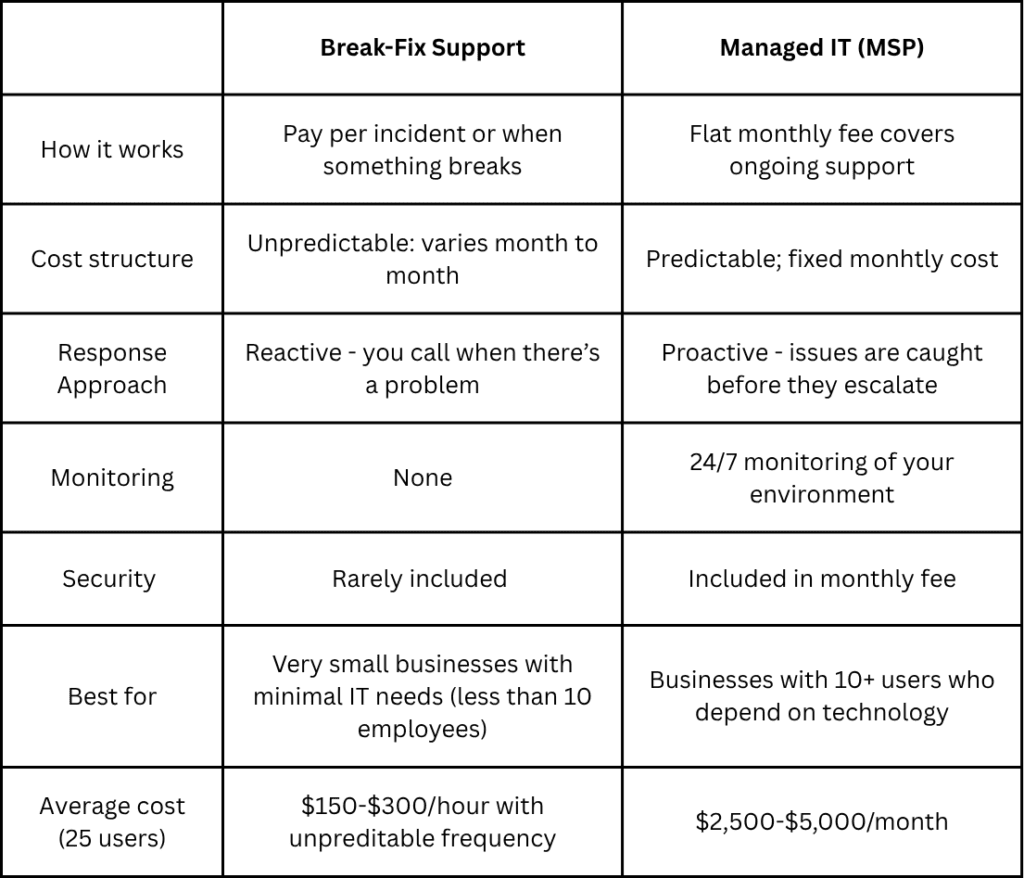
For most businesses in the 10–50 employee range, managed IT delivers more value and better protection than break-fix – especially when you factor in the cost of potential downtime.
A Realistic Budget Range for a 25-Person Business
Putting it all together, here’s what a realistic small business IT budget looks like for a company with 25 employees:
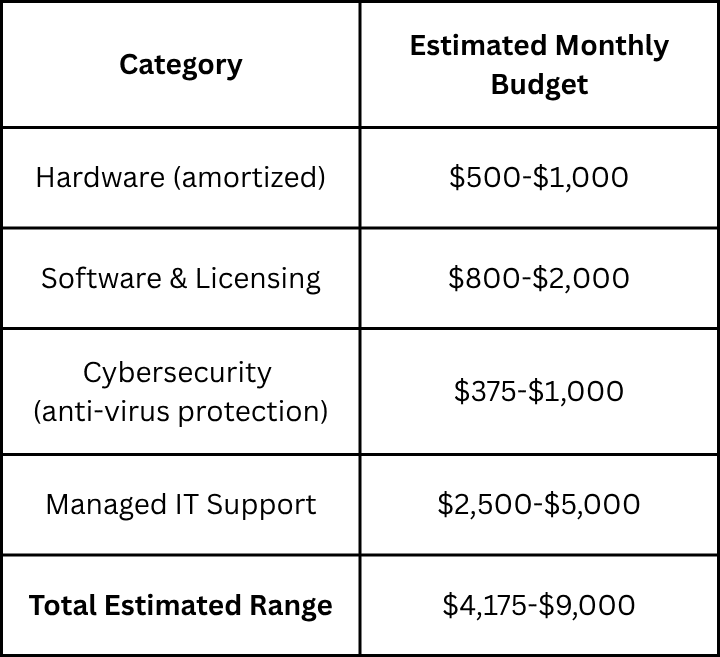
That may feel like a wide range – and it is, because every business is different. Industry, compliance requirements, growth stage, and existing infrastructure all affect the final number. The goal isn’t to hit a specific dollar amount; it’s to ensure every dollar is intentional and aligned with your business goals.
How to Build a Budget that Grows with You
A technology budget isn’t a one-time exercise. It should be reviewed at least annually – and ideally tied to your broader business planning cycle. Here’s a simple framework to get you started:
- Audit what you have – inventory all hardware, software, and services currently in use.
- Identify gaps – what’s missing, outdated, or creating risk?
- Prioritize by impact – not every need is urgent; rank by business impact.
- Align costs to goals – each budget line should tie back to a business objective.
- Build in a buffer – technology surprises happen; plan for 10-15% flexibility.
- Review regularly – set a quarterly check-in to adjust as your business evolves.
If you’re not sure where to start, a technology assessment with a trusted IT partner is one of the most valuable investments a small business can make. It gives you a clear picture of where you stand today – and a roadmap for where you need to go.
Ready to build a technology budget that works for your business? Macatawa Technologies helps businesses take the guesswork out of IT planning. Contact us for answers, guidance, or support.