

Business success is often tied to the quality of your business relationships. There are a lot of people you need to trust: your vendors to get you whatever supplies you need, your team to complete their responsibilities without letting in threats, and your customers to turn to you for what they need. Unfortunately, cybercriminals are willing to take advantage of such trust to accomplish their own ends.
A cybercriminal really couldn’t care less how much trust you share with your many contacts unless they can use that trust to their advantage. That’s why phishing scams exist, and why a particular approach to them—display name spoofing—can be particularly effective.
Let’s go over what display name spoofing is, and how to prevent it from infiltrating your business.
Understanding Display Name Spoofing
Display name spoofing is a tactic that many hackers will include in their phishing attacks. Phishing is a scam where a cybercriminal will reach out, posing as someone else or as an organization, to subvert your security by manipulating someone in your business. By spoofing their display name, these attacks are made even more effective. Let’s break down how display name spoofing works.
Email signatures are common in the business world, which gives cybercriminals who use display name spoofing an advantage. Once the cybercriminal selects their target, they intently research that target to find someone who might be able to influence their behaviors and then target them posing as that someone.
As a result, display name spoofing could look something like this:
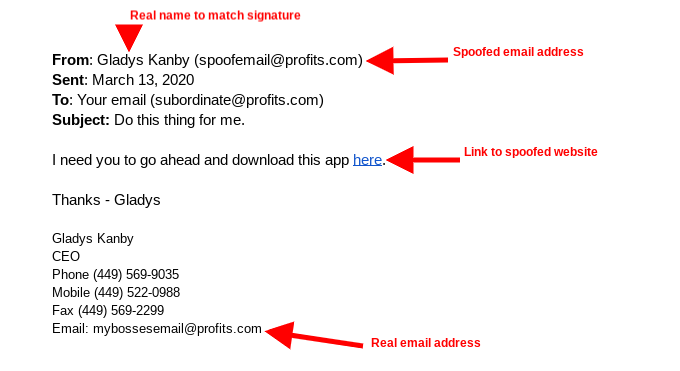
Looking closely, the only sign that something here is questionable is the email address… and considering that some email clients don’t show the full address by default, many employees may not even consider that an email isn’t legitimate.
How to Fight Back Against Display Name Spoofing
Consider the kinds of security you should have implemented around your business. You lock the doors, you may have security cameras, and you should have some access control policies to make sure that your employees can use the resources they need to do their jobs. Similar security measures should be put in place to protect your digital assets as well.
To do so effectively, you need to have a strategy in place that acknowledges the hard reality that your business will be faced with a phishing attack. As a crucial part of this, your team needs to be trained so they are ready to spot these attacks and respond accordingly.
Here are a few ways you can gauge whether a message can be trusted or not:
- Thoroughly inspect both the name and sender’s email address before you act.
- Check the content for misspellings or completely incorrect uses of grammar.
- Consider if the sender would send a message asking you to take cavalier action.
- Consider if the sender would ask you to send them authorization credentials through email.
If one of your team members ever doubts the veracity of an email they receive, you need to be sure that they know to—and how to—properly verify it. Doing so generally takes minutes and can significantly reduce the risks that display name spoofing presents.
For more assistance in identifying cybersecurity threats and training your team how to respond as they should, reach out to Macatawa Technologies. Give our professionals a call at 616-394-4940.